D2RUO Official Docs
🛡️ Diablo 2: Resurrected Utility Overlay (DUO)
Section titled “🛡️ Diablo 2: Resurrected Utility Overlay (DUO)”A multi-purpose utility overlay (DUO) designed to comprehensively enhance your Diablo 2: Resurrected gameplay. In addition to real-time tracking for the upcoming Terror Zone and Diablo Clone progression across servers, it provides various quality-of-life utilities, such as a highly customizable Buff Skill Timer and an In-game Item Search Dictionary, directly on your game screen.
⚠️ Disclaimer & Safety Notice:
- Structural Safety: DUO is a 100% screen-capture (OCR) based external application that never modifies, hooks, or accesses the game’s memory (RAM) or client files. It operates on the exact same technical mechanisms as standard recording/streaming software (such as OBS Studio or Discord screen share). Because it maintains zero contact with the game’s internal data structures, it does not trigger Blizzard’s anti-cheat system (Warden), making it exponentially safer than traditional client mods or memory-reading overlays.
- Zero Automation: This utility contains absolutely no automated macro elements, such as auto-potion or automated keystrokes/mouse movements. It functions strictly as a non-intrusive visual and audio alert assistant.
- Terms of Use: However, under the broad definition of ‘unauthorized third-party software’ in Blizzard’s EULA, no external utility can claim absolute immunity in a multiplayer environment. The user assumes all responsibility and risk for any consequences, including account restrictions, that may arise from using this program. Please use it at your own discretion.
📑 Table of Contents
Section titled “📑 Table of Contents”- 📸 Screenshots
- 🚀 Getting Started
- ⌨️ Hotkeys
- ✨ Key Features
- 💡 Custom Tips
- 📂 File & Folder Descriptions
- 💻 Tested Environment & Troubleshooting / FAQ
- ☕ Contact & Support
📸 Screenshots
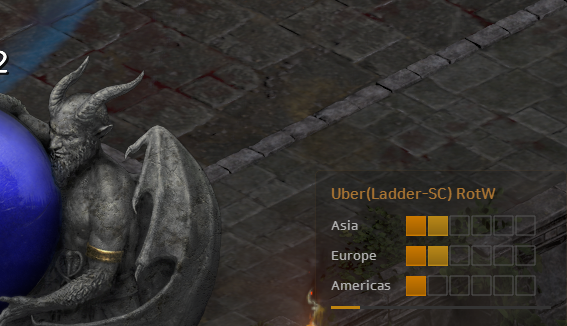
Section titled “📸 Screenshots”1. Next Terror Zone & DClone Progress
Section titled “1. Next Terror Zone & DClone Progress”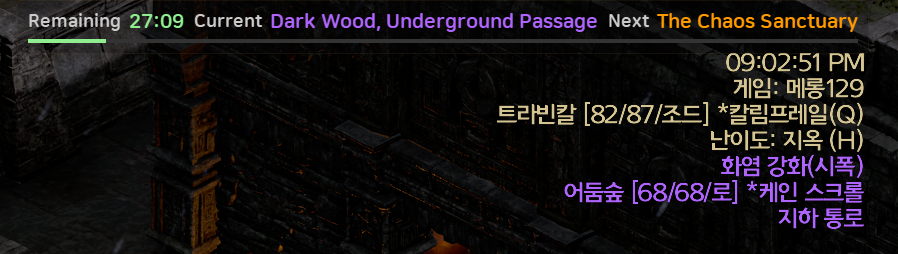
2. Buff Overlay & Profile Management
Section titled “2. Buff Overlay & Profile Management”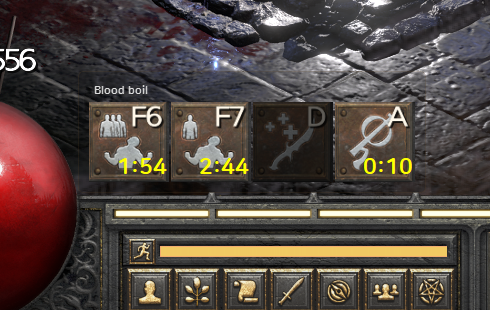
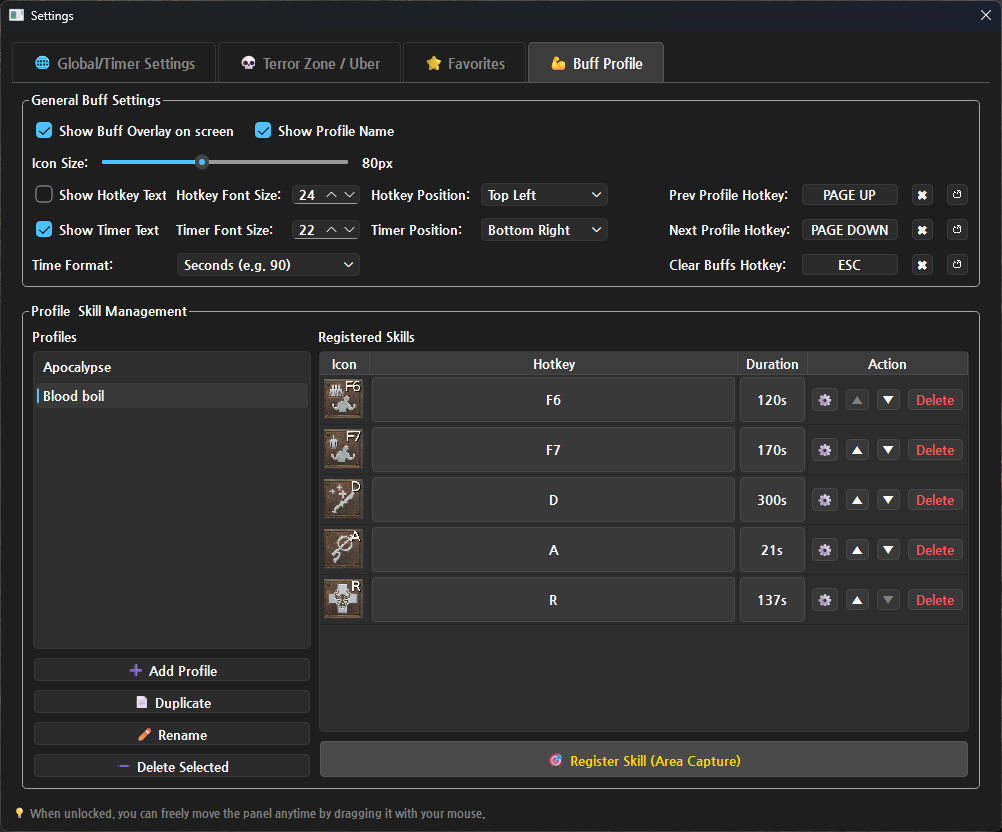
Capture any skill icon directly from the game screen to set up and manage your own buff durations. Group your skills by profile for different characters or builds using the intuitive settings UI.
3. Real-time Item Search Dictionary
Section titled “3. Real-time Item Search Dictionary”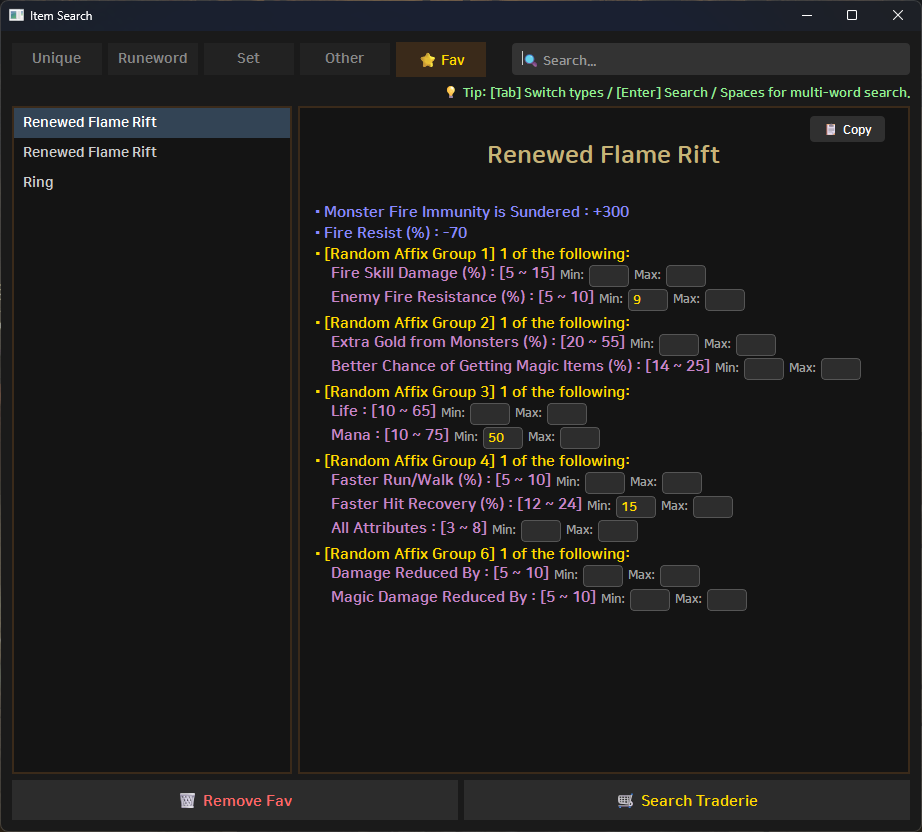
Instantly search for Unique/Runeword items, base materials, aliases, and check their market value on Traderie without tabbing out of the game.
4. Speedrun Timer
Section titled “4. Speedrun Timer”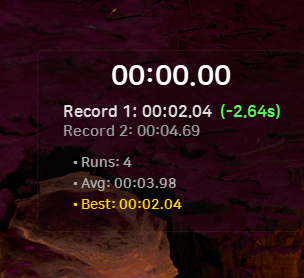
Intuitively compare and record how much your clear time has improved after changing your equipment or builds.
🚀 Getting Started
Section titled “🚀 Getting Started”1. Download & Preparation
Section titled “1. Download & Preparation”- Go to the 👉 Latest Release Page (Click), download the installer (
DUO_Setup.exe), and run it.- Default Installation Path:
%LocalAppData%\Programs\D2R Utility Overlay(You can copy & paste this into your file explorer address bar)
- Default Installation Path:
- Sign up/Login to d2tz.info and copy your API Key (Token) from the User Profile page.
💡 How to keep your settings when updating:
- Auto-Update (Recommended): Simply click the
⚡ Auto-Updatebutton on the overlay when a new version is detected. It will safely download and install the update in the background while preserving all your custom settings and profiles.- Manual Update: If you download the new
.exeinstaller manually, simply run it. It will safely overwrite the files while preserving your oldd2_overlay_config.jsonandprofiles.
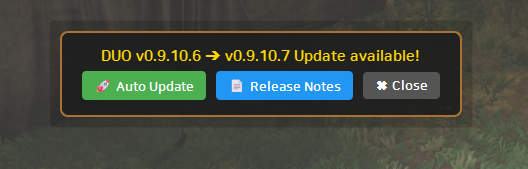
💡 When a new version is detected, the
⚡ Auto-Updatebutton appears at the top of the screen.
2. Run & Configure
Section titled “2. Run & Configure”- Run Diablo 2: Resurrected. (Fullscreen Mode recommended).
- Run the D2R Utility Overlay shortcut created on your Desktop or Start Menu. (Run as administrator if your D2R client is also running as admin).
- Press
Ctrl+Shift+Sor right-click the system tray icon to open the⚙️ Settingswindow. - Paste your API Key (Token) into the settings and customize layouts, hotkeys, and features.
⌨️ Hotkeys
Section titled “⌨️ Hotkeys”| Category | Hotkey | Function |
|---|---|---|
| Global | Ctrl + Shift + S | Open Settings Instantly |
| Item Search | Ctrl + F | Open Item Search Window |
Tab | (In Search) Toggle Unique / Runeword Tabs | |
↑ / ↓ | (In Search) Navigate Search Results | |
ESC | Close Search Window | |
| Item Recognition | Ctrl + R | Drag scan item area manually |
Ctrl + T | ⚡ Auto-detect item tooltip box | |
| Build Snapshot | Ctrl + B | 📷 Open / Close Gear & Skill Build Snapshot Manager |
| QoL Features | Shift + C | Copy current game name (for quick Relay Runs) |
| Buff Overlay | PageUp / PageDown | Switch Buff Profiles |
| User Defined Keys | Trigger Specific Buff Timer | |
| Speedrun Timer | Home | Start / Pause Timer |
End | Record Complete (Save Lap Time) | |
Shift + Del | Reset All Records & Stats |
✨ Key Features
Section titled “✨ Key Features”1. 😈 Real-time TZ & DClone Tracker
Section titled “1. 😈 Real-time TZ & DClone Tracker”- 🎯 Custom Favorite Alerts: Get text blinks and sound notifications when your favorite zones are discovered and 5 mins before they start.
- 🔔 Uber Alerts & Spawn Detection: Choose your expansion (LoD/RotW) and get notified when DClone stages increase. Also provides warning chimes and voice alerts if DClone progress drops unexpectedly (spawned and reset between polling cycles).
- ⚡ Smart Polling: Highly optimized API calls to prevent traffic waste, automatically switching to high-speed boost mode upon detecting stage changes.
2. 📖 In-game Item Search Dictionary
Section titled “2. 📖 In-game Item Search Dictionary”- 🔍 Powerful & Flexible Search Engine: Search quickly by English/Korean names, base items, required runes, or well-known aliases. Use spaces to combine these keywords effortlessly.
- 🤖 Auto Recognition (OCR) & Custom Settings (Win 11 Only): Quickly scan items by dragging (
Ctrl+R) or using the auto-detect box (Ctrl+T).- Choose exactly how the scanned numbers are applied (e.g., min only, max only, or percentage adjustments).
(Easy Explanation: You no longer need to manually type item stats. Just press the hotkey, and the program will read the screen to automatically fill in the values for your Traderie search.)
- 📈 Seamless Traderie Integration (Price Check & Quick Listing) [NEW]:
- 🛒 Live Market Search: Instantly opens the Traderie market page with your configured variable stats pre-applied.
- 📝 Quick Listing (Price Check): Opens the Traderie listing page with all scanned variable stats pre-filled. Simply click ‘Create Listing’ and enter your price to list items for sale in seconds!
- 📦 Category Item Base Auto-Detection & Selector: When scanning broad categories like ‘All Boots’ or ‘All Gloves’, DUO automatically detects the specific base item (e.g., Sharkskin Boots) from OCR text. Live search browses all boots broadly, while the listing button targets the exact base for immediate sale.
- ⚡ Instant Tooltips: Hovering over search/listing buttons or base dropdown displays descriptive tooltips with 0ms delay.
- 💾 Item Drop History (DB) [NEW]: Automatically records the stats and drop locations of your looted items, which can be reviewed anytime. Links with the new Region Statistics feature below!
3. 🛡️ Powerful Buff Overlay
Section titled “3. 🛡️ Powerful Buff Overlay”- 📑 Profile & Skill Management: Create multiple profiles for different builds. Easily capture skill icons directly from the game screen to register hotkeys and durations.
- 🚨 Center Screen Countdown [NEW]: Check important skills to trigger a flashing countdown right in the center of your screen when the buff is about to expire, ensuring you never miss a recast during intense fights.
- 🔄 Smart Reset & Ignore System:
- Auto-Reset: Automatically resets your buff timers upon entering or leaving a game.
- Ignore Keys: Prevent accidental buff resets by registering keys like your inventory hotkey as ‘Ignore if Prev Key’.
- 🎨 Highly Customizable: Adjust icon sizes, text sizes/positions, and formats. Assign custom audio files (
.wav,.mp3) to individual skills using thesoundsfolder.
4. 🗺️ Region & Monster Tracking [NEW]
Section titled “4. 🗺️ Region & Monster Tracking [NEW]”- ⏱️ Region Entry & Statistics: Tracks the exact time spent in each area and compiles statistics. Provides a popup for the previous area’s time and links with the ‘Item Drop DB’ to analyze your most profitable farming spots.
- 🧭 Mini Guide Map: For areas with fixed exit generation rules, a mini-map pointing to the exit direction appears in the bottom right corner (Toggleable and display time configurable).
- 👁️ Monster Attribute Alert (Warlock specific / Win 11 OCR): When hunting for specific attributes (e.g., for Bind Demon), DUO scans monster attributes on screen in real time and triggers visual popups and sound cues. (Operates using the Windows 11 Snipping Tool OCR engine, identical to Auto Item Recognition.)
5. ⏱️ Speedrun Timer
Section titled “5. ⏱️ Speedrun Timer”- 📊 Record Comparison: Optimized for measuring clear time variations due to equipment swaps or build changes. It intuitively displays the time difference (+/-) from the previous run using color coding.
- 📌 Real-time Statistics: Provides a clean, fixed-size UI that displays your current elapsed time alongside runs, average clear time, and your best record.
6. 📷 Gear & Skill Build Snapshot Manager [NEW]
Section titled “6. 📷 Gear & Skill Build Snapshot Manager [NEW]”- 🛡️ Comprehensive Slot-by-Slot Capture: Manage and capture your entire build setup by individual slots — Character Gear (12 slots: Helm, Armor, Main/Swap Weapons & Shields, Gloves, Belt, Boots, Amulet, Rings 1 & 2), Mercenary Gear (3 slots: Helm, Armor, Weapon), Charms, and Character Stats & Skill Trees (Tabs 1–4).
- ⚡ Smart Auto & Drag Capture Modes:
- ⚡ Auto Capture: Click ‘Auto’ on any slot, hover over the item in-game, and press
Spaceto automatically detect and cleanly crop the item tooltip. (Cancel:ESC) - ⌨ Drag Capture: Click ‘Drag’ on any slot and press
Spaceto open the drag selection window to manually capture any screen region. (Cancel:ESC)
- ⚡ Auto Capture: Click ‘Auto’ on any slot, hover over the item in-game, and press
- 📜 Dynamic Custom Charms: Add, name, and manage unlimited custom charm slots (e.g., Sunder Charms, Hellfire Torch, Annihilus, Small Charms).
- 🔍 OCR Item Dictionary & Traderie Sync: Click the
🔍button on any captured gear/charm card to instantly recognize item stats via OCR, search in the DUO Item Dictionary, and check live market prices on Traderie with a single click. - 🖼️ Clean Batch Image Compositing & 1-Click Clipboard Copy:
- 🛡️ Merge Gear & Charms: Automatically combines character gear, mercenary setup, and charms into a single clean 3-column vertical image.
- 🌟 Merge Full Build: Merges your entire setup — gear, mercenary, charms, stats, and skill trees — into one comprehensive build snapshot image.
- 📋 Copy to Clipboard: In addition to the final merged image, individual slot images (via the zoom preview dialog) can also be copied directly to your clipboard with one click for effortless sharing (
Ctrl+V) in Discord and gaming communities.
- 📂 Individual File Saving & Multi-Build Management:
- Direct Folder Access: Click the
📂 Open Folderbutton to view and manage individual captured image files (.png) saved cleanly for each slot. - Multi-Build Management & Zoom Viewer: Create, clone, rename, and search multiple build setups. Click any card thumbnail to open a high-resolution viewer with smooth mouse drag panning.
- Direct Folder Access: Click the
7. 📺 OBS Studio Streaming Support & UI Convenience [NEW]
Section titled “7. 📺 OBS Studio Streaming Support & UI Convenience [NEW]”- 🎥 Dedicated OBS Stream Overlay (Window Capture):
- Enable
OBS Stream Overlayin Settings to register a dedicatedDUO - Stream Overlaywindow for OBS Studio [Window Capture]. - All active overlays (Terror Zone, Uber Diablo, Buff Timers, etc.) are rendered 1:1 onto a single transparent canvas, providing a smooth, flicker-free stream overlay.
- Maintains stable output on stream even when alt-tabbing or switching active applications.
- Enable
- 🖱️ Click-through: Mouse clicks pass right through the overlay, ensuring uninterrupted gameplay.
- 💬 Smart Chat Hotkey Block: Opening the chat window with
Entersafely disables overlay hotkeys (buffs, item search) to prevent misclicks and accidental triggers. - 📋 Quick Game Name Copy: Easily copy the current game’s name with a single hotkey (
Shift+C). Perfect for quick copy-pasting during sequential relay runs. - 🔔 Smart Item Display Reminder: If you use the ‘Toggle Item Display’ option in-game and forget to turn it on after joining a room (especially with loot filters), a helpful reminder message will appear at the top of the screen.
- 🔄 Free Layout & Auto-Update: Drag and drop panels anywhere. Enjoy seamless background updates with a simple 1-click update button.
💡 Custom Tips
Section titled “💡 Custom Tips”- Open Install Folder: Right-click the DUO icon in the system tray (bottom right) and select
📂 Open Install Folderto instantly access the directory. Use this convenient feature for the customizations below! - Custom Fonts: Place your font files inside the
fontsfolder located in the install folder, and they will be available for selection in the settings. - Custom Alert Sounds: Place your desired audio files (
.wav,.mp3) inside thesoundsfolder to use them as custom alerts. - Profile Sharing & Backup: Copy the
profilesfolder within the install directory to easily back up your custom buff profiles or share them with others. - Build Snapshot Backup & Sharing: You can back up or share individual build folders inside the
buildsdirectory to keep or transfer your captured gear setups and composite images.
📂 File & Folder Descriptions
Section titled “📂 File & Folder Descriptions”Structure inside your installation directory (C:\Users\<YourUsername>\AppData\Local\Programs\D2R Utility Overlay):
| File / Folder | Description |
|---|---|
DUO.exe | Main executable file. |
d2r_stats.db | SQLite database storing your region statistics and item drop history. |
act_map.json | ⚠️ Essential TZ area level and Act data (Do not delete). |
area.json | ⚠️ Essential TZ translation data (Do not delete). |
d2_overlay_config.json | Auto-saved user preferences. |
profiles/ | Folder containing your captured buff icons and skills.json. |
builds/ | Folder containing gear/skill screenshots and build configuration data (build_info.json) per build. |
sounds/ | Place your custom .mp3 or .wav files here for buff alerts. |
item/data/ | Database files used for the item search dictionary. |
fonts/ | Default built-in fonts. You can add your own font files here. |
models/ | Folder where OCR modules required for all recognition features (items, monster attributes, areas, etc.) are stored. |
assets\guides\ | Images used for displaying the mini guide map. |
log/ | Folder where operational logs (.log) and debug/capture images are stored. |
📝 Log Files (
.log) Log files and debug/capture images are organized inside thelog/folder. You can easily open this folder anytime by right-clicking the system tray icon and selecting ”📁 Open Log Folder”. These files record the operational status of the program. When a file’s size grows, it is automatically backed up with a_backupsuffix (e.g.,app_debug_backup.log), while the latest information is continuously written to the.logfile. If you encounter any issues, providing the log files and debug images inside thelog/folder when submitting an issue will enable much faster and more accurate analysis.
app_debug.log: Default overarching log file.api_usage.log: d2tzinfo data request logs (Terror Zone, DClone).ocr_debug.log: Text recognition (OCR) operation logs.area_debug.log: Region name recognition operation logs.monster_debug.log: Monster recognition operation logs.
⚖️ Open Source License Notice:
- This program dynamically links PySide6, which is licensed under LGPLv3.
- This program uses Tesseract OCR and pytesseract for text recognition on the game screen, which are licensed under the Apache License 2.0.
💻 Tested Environment & Troubleshooting / FAQ
Section titled “💻 Tested Environment & Troubleshooting / FAQ”- OS: Windows 11 Pro 25H2 (64-bit)
- Display: 2560x1440 (QHD)
- Game: Diablo 2: Resurrected (Recommended: Fullscreen Mode)
- Build: Python 3.12 (PySide6)
🌐 Microsoft Edge “is not commonly downloaded” Warning If Microsoft Edge or Windows SmartScreen blocks the download, it is simply because the file is newly released and has not yet built up a download reputation history with Microsoft. It is safe to bypass.
- Open the Edge download list (
Ctrl+J). - Click the three dots (…) next to the blocked file and select [Keep].
- In the pop-up warning, click [Show more] and then select [Keep anyway] to complete the download. (Easy Explanation: This is a preventative warning triggered because the software is from an independent developer. The file is safe, so you can confidently click ‘Keep anyway’ to proceed.)
🖥️ For OLED / HDR Users (Tooltip Auto-Detection Issues) If you are playing on a high-resolution OLED/HDR monitor and the automatic item detection consistently fails, it might be due to Windows HDR screen capture distortion making the item tooltip background too transparent for the OCR to read.
As a potential workaround, try going to your D2R In-game Settings -> Game Play -> Accessibility -> and enable “Large Font Mode”. This setting may increase the tooltip’s background opacity, which could significantly improve the text recognition contrast. While this has proven helpful for some users, please note that results may vary depending on your specific display configuration. (Easy Explanation: Due to how HDR rendering works, captured screenshots can sometimes make the item description background too see-through, blending the text into the game world. Enabling Large Font Mode thickens and darkens the background, making it much easier for the program to scan the text clearly.)
✂️ OCR (Text Recognition: Items, Monster Attributes, etc.) Not Working (Snipping Tool Troubleshooting)
All on-screen text recognition (OCR) features in DUO—including Auto Item Recognition (Ctrl+R, Ctrl+T), Monster Attribute Detection (Warlock utility), Area Entrance Detection, and Build Snapshot Gear OCR—share and rely on the modern Windows 11 Snipping Tool OCR engine.
If you upgraded from Windows 10 to Windows 11, or if a Windows update had issues, the Snipping Tool might not have updated to version 11 properly, or its package files may be corrupted. In this scenario, not only item recognition, but also monster attribute detection and all other OCR functions will fail to scan on-screen text. In this case, you must check, update, or reinstall the Snipping Tool as outlined below to restore all recognition features.
- Open PowerShell and enter the command:
(Get-AppxPackage -Name Microsoft.ScreenSketch).InstallLocation - If the output path shows a version 10 instead of 11, your Snipping Tool has not been updated to the Windows 11 version.
- Even if the output path shows version 11, if item or monster attribute detection still does not work at all, the Snipping Tool might be corrupted or improperly registered in your system.
- In any of these cases, please refer to the Microsoft troubleshooting and download page to completely uninstall and reinstall the app.
(Easy Explanation: All text-reading capabilities in DUO—such as item stats scanning, monster attribute alerts, and area name tracking—share the Windows 11 Snipping Tool OCR engine. If your Windows was upgraded to 11 but the Snipping Tool was left behind on an older version or became corrupted, the app will not be able to read any on-screen text, causing both item recognition and monster attribute detection to fail. Reinstalling the newest version via the link will fix the issue for all recognition features.)
👾 Auto Monster Attribute OCR / Detection Troubleshooting (FAQ) If the automatic monster attribute detection or popup/audio alert is not working properly, please review the following checklist:
- Windows 11 OS & Snipping Tool Updates (Most Critical):
- All screen text recognition (OCR) features in DUO—both Item Recognition and Monster Attribute Detection—share the Windows 11 Snipping Tool OCR engine. If monster attributes are not being detected at all, please refer to the [✂️ OCR Not Working (Snipping Tool Troubleshooting)] section right above to verify and update/reinstall your Snipping Tool.
- OCR Detection Area Settings:
- Open Settings (
Ctrl+Shift+S) -> [👾 Monster OCR] tab and verify that the detection region coordinates match your current display resolution and game layout. - If necessary, click
🎯 Select New Area with Mouseand drag across the top-center area of the screen where monster names and attributes appear to recalibrate coordinates.
- Open Settings (
- Overlapping Text / Overlay Interference (Screen Capture Method):
- If other text or overlay UI elements (such as Terror Zone info banners) overlap within the capture box, OCR accuracy may degrade.
- 💡 Recommended Tip: Set the
Screen Capture MethodtoCapture Diablo Window Onlyin Settings. This captures only the clean game client window without any interference from external overlay layers.
- Required Attributes (
*) & Min. Optional Attributes Setting:- In the attribute list, any attribute prefixed with an asterisk (
*) (e.g.*Demon,*Cursed) is a strictly required condition that must match completely. - If the Min. Optional Attributes count is set higher than what the monster actually has, the alert will not trigger. (Set it to
0if you only want alerts triggered by required attributes).
- In the attribute list, any attribute prefixed with an asterisk (
- Character Class in Active Buff Profile (Warlock Only):
- Monster Attribute OCR is designed specifically for the Warlock class (‘Bind Demon’ skill utility). To eliminate unnecessary CPU overhead, detection only runs when the currently active Buff Profile is configured as
Warlock(악마술사). - If a profile for another character class (e.g., Sorceress, Paladin) is active, monster detection automatically pauses. Please ensure your active buff profile’s class is set to Warlock.
- Monster Attribute OCR is designed specifically for the Warlock class (‘Bind Demon’ skill utility). To eliminate unnecessary CPU overhead, detection only runs when the currently active Buff Profile is configured as
(Easy Explanation: Make sure you are on Windows 11 with the capture region set to your screen, and try switching the capture method to ‘Capture Diablo Window Only’ to avoid overlay interference. Also check your required attributes (), optional count, and make sure your active buff profile belongs to a Warlock!)*
👥 Overlay Not Working When Using Multi-Loader (Run as Administrator) When using a multi-loader, the game is usually run with administrator privileges. In this case, you must also run this overlay program (DUO) as an administrator for it to work properly. Right-click the DUO shortcut and select ‘Run as administrator’. (This is mentioned in the quick start, but noted here again for troubleshooting.) (Easy Explanation: If the game is running with higher (administrator) privileges, the overlay app also needs the exact same privileges to display things on top of the game window and detect your hotkeys.)
🛡️ Security & False Positives (Antivirus Blocks/Deletions)
This program uses the keyboard module to detect your in-game hotkeys. Although switching to a standard installer (.exe) distribution significantly reduces false positives, some antivirus software may still incorrectly flag and block its execution.
(Easy Explanation: Intercepting keyboard input is a method frequently used by malicious programs, so it is a natural phenomenon for antivirus software to be suspicious and block it by default.)
If the program won’t run or the shortcut does not work, please try the following steps:
- Add to Exclusions (Recommended): Add the installation folder (
C:\Users\<YourUsername>\AppData\Local\Programs\D2R Utility Overlay) to your antivirus exclusion/exception list. - Keep the Default Path: Installing the program in the default
AppData\Localdirectory helps reduce false positives, as it is a standard system directory for application data. It is recommended not to change this path. - Disable Smart App Control: If you are using Windows 11, you may need to turn off Smart App Control if it blocks execution.
- Star the GitHub Repo: Leaving a Star ⭐ on this GitHub repository helps build the software’s reputation metric over time, which may help reduce false positives from reputation-based filters.
☕ Contact & Support
Section titled “☕ Contact & Support”💡 Bug Reports & Feature Requests (Feedback)
Section titled “💡 Bug Reports & Feature Requests (Feedback)”If you encounter any bugs or have ideas for new features, please feel free to let me know using the methods below!
- GitHub Issues (Recommended): Please leave a post on the GitHub Issues page (Click).
- Email: You can always send an email to
miabohoja1@gmail.com.
☕ Support (Donation)
Section titled “☕ Support (Donation)”This program is 100% free to use for everyone! However, if you found this tool helpful for your gameplay and wish to support its ongoing development, you can optionally buy the developer a coffee. Your support is always greatly appreciated!


Credits: Data provided by D2TZ.info